Seedance 2.0, 2.0 Fast and 2.0 Mini in one place

Seedance 2.0: don't just describe the video. Show it.

Some things are hard to put into words: a face, a dance, the way a camera moves. With Seedance 2.0 you hand over a photo, a clip or a piece of audio along with your prompt, and get back up to 15 seconds of video with the sound already in.

Free credits when you sign up. No card needed.

Need a starting point?

Made with Seedance 2.0, Fast and Mini

All four clips were generated on Seedance.kr. The prompt and the input images are shown with each one, so you can load the same settings and change whatever you like.

Seedance 2.0: a photo for the face, a video for the moves

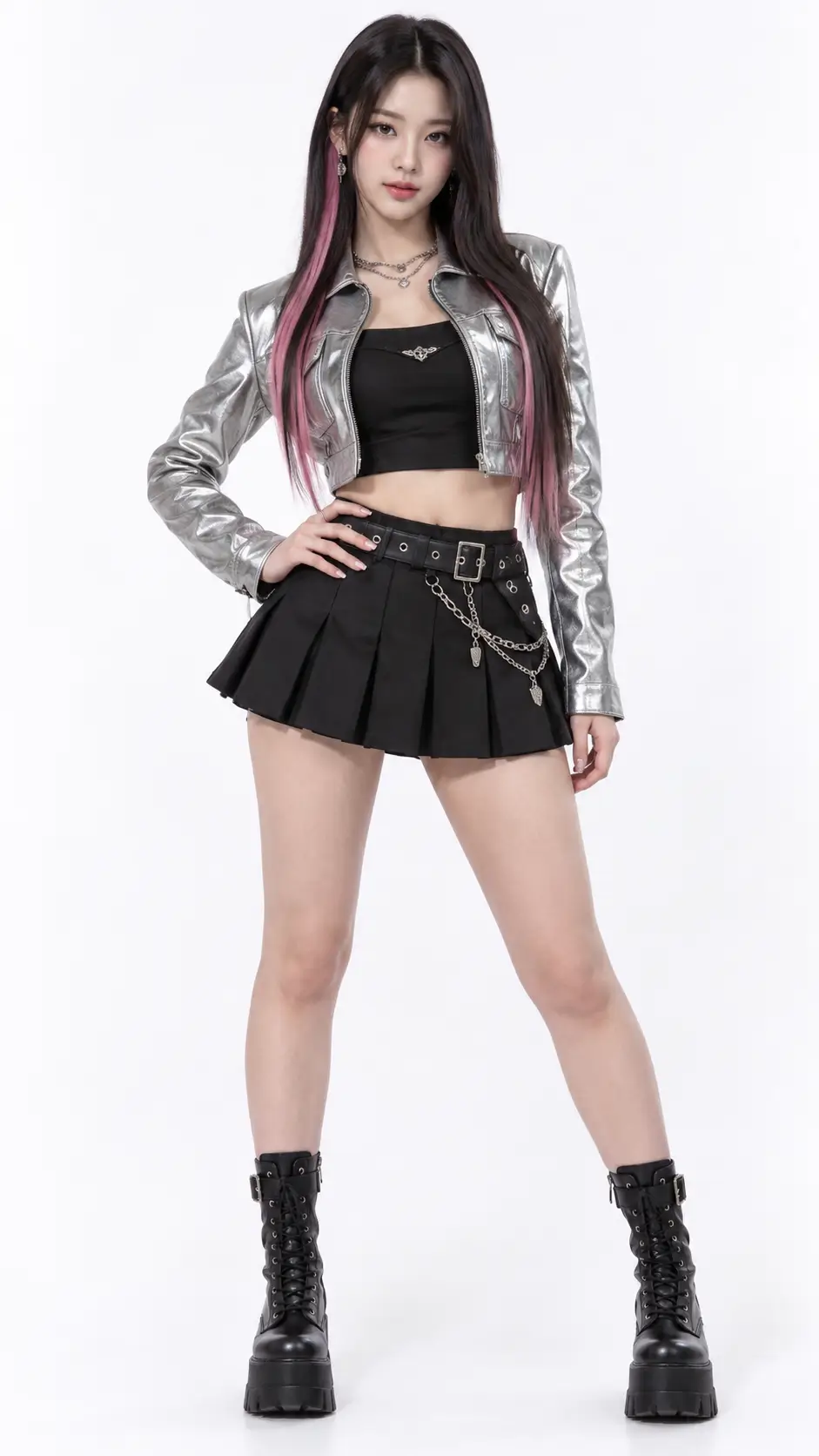
One image of the performer and one practice-room dance clip went in. Seedance 2.0 kept her look from the photo, took the choreography from the clip and moved both onto a concert stage.

Input images

Seedance 2.0 reference image: a K-pop performer with long black hair and pink highlights in a silver cropped jacket

Prompt

The girl from image 1 performs exactly the choreography of video 1, matching its timing and body movements, on a huge K-pop concert stage. Keep her face, hair and outfit identical to image 1. Laser beams, an LED wall with abstract pink and blue graphics, haze and thousands of glowing lightsticks in the crowd. Full-body shot with a slow push-in. Energetic K-pop dance track with a heavy bass and cheering fans.

Seedance 2.0: six seconds from text alone

No images here, only a prompt. The crackle and the crunch you hear were written into that prompt and generated with the picture.

Prompt

Close-up mukbang ASMR shot. A young woman with a neat ponytail sits at a table facing the camera and lifts a large spoonful of thick, glowing orange molten lava from a black stone bowl. The lava stretches like melted cheese; she takes a big bite and it crunches like crispy candy, sparks and embers flickering. She widens her eyes and smiles with delight. Dark background, warm glow lighting her face, fixed camera. No music, only sizzling, crackling and crunchy chewing sounds.

Seedance 2.0 Fast: one starting image

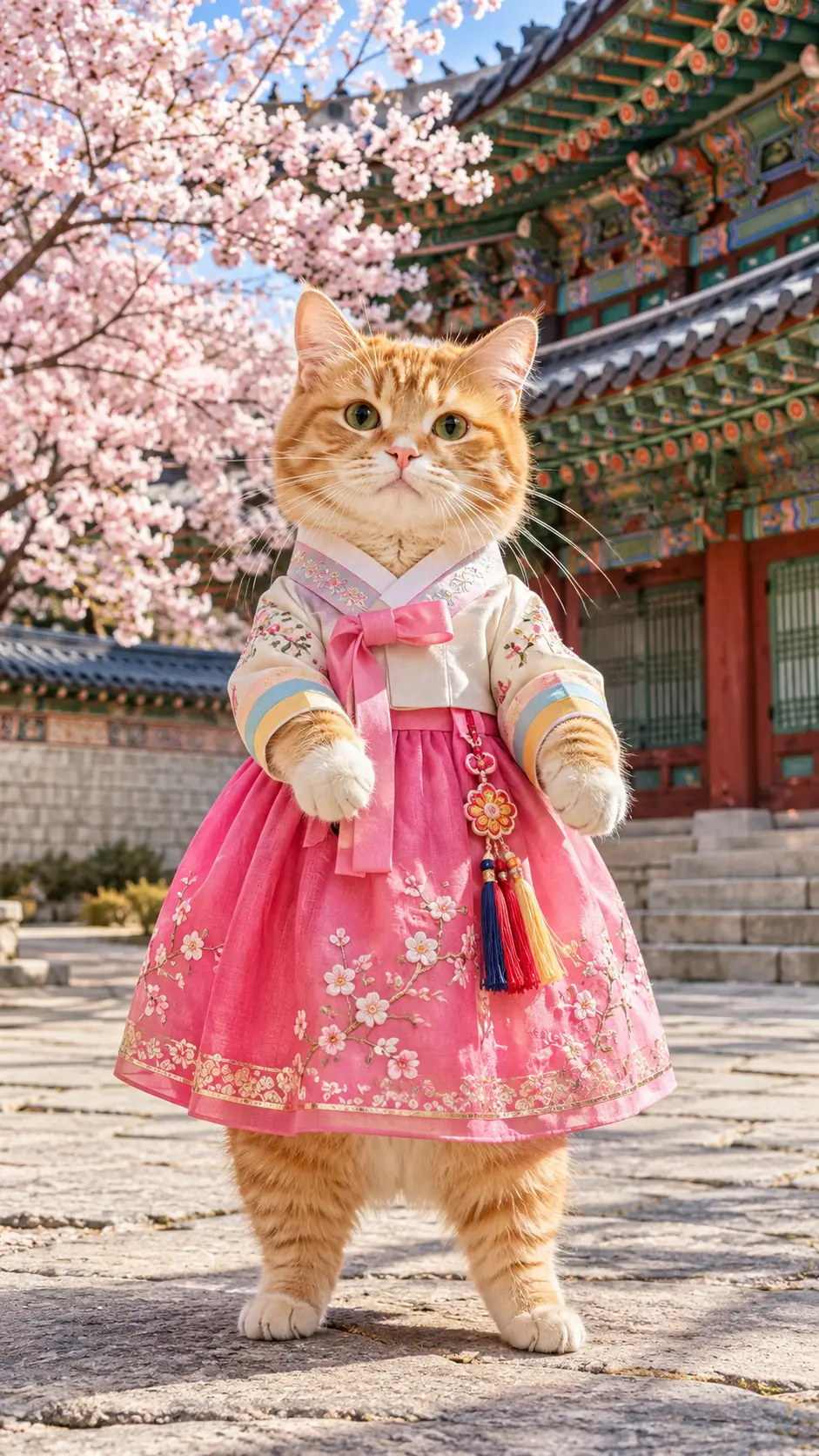
A single still was set as the first frame, and the prompt only describes what happens next. This one ran on 2.0 Fast, the model to reach for when you want to see a result sooner.

Input images

Seedance 2.0 Fast start frame: an orange tabby cat in a hanbok standing in a Korean palace courtyard

Prompt

The cat starts a cute, bouncy dance — swaying its hips, hopping from paw to paw and waving its front paws to the beat — while cherry blossom petals drift through the air. The camera slowly orbits around the cat, keeping its whole body in frame. Playful upbeat music mixed with traditional Korean percussion.

Seedance 2.0 Mini: a character from one photo

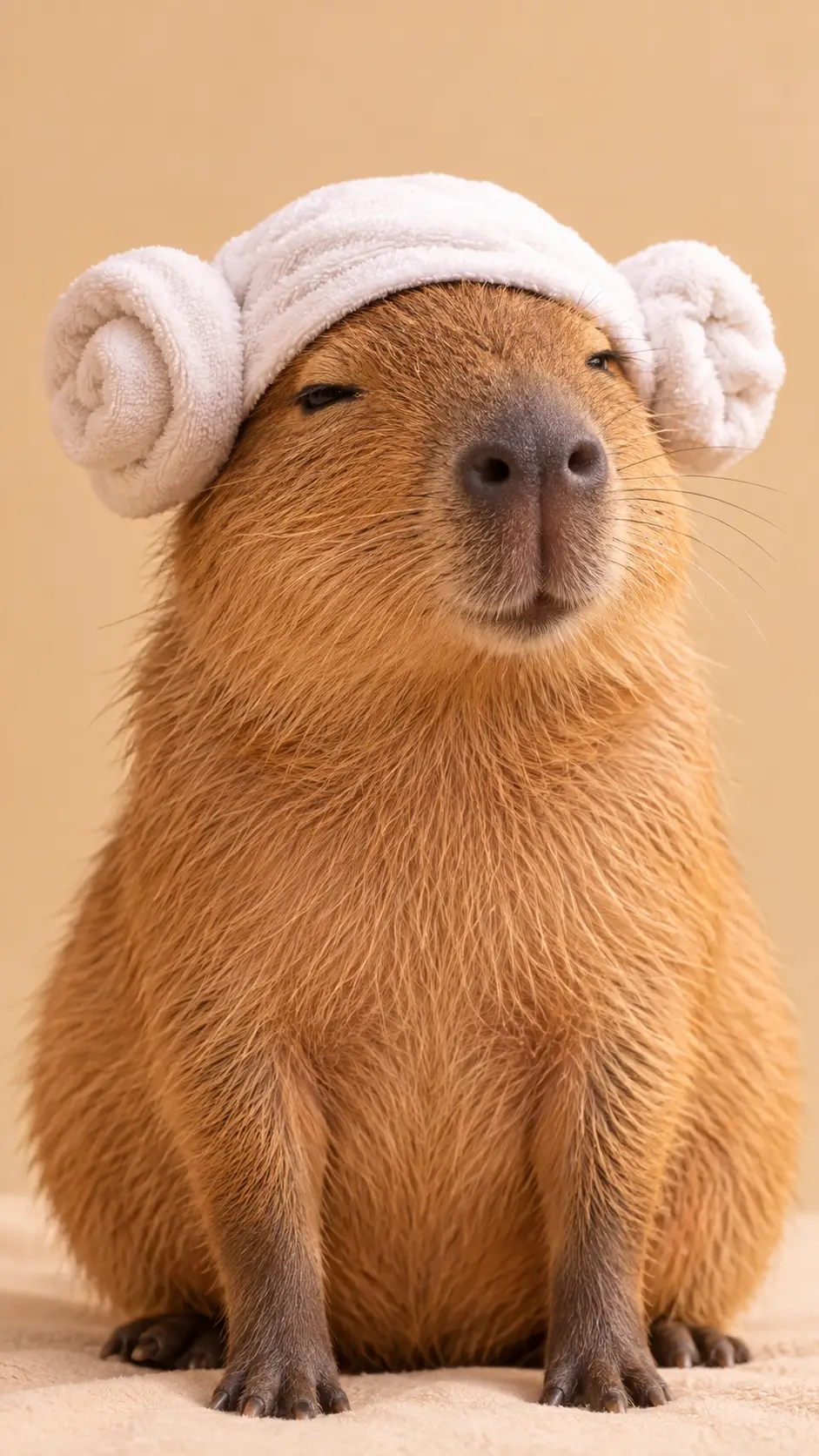
The capybara and its towel hat come from one reference image. 2.0 Mini uses the fewest credits of the three, which makes it a good place to test an idea like this.

Input images

Seedance 2.0 Mini reference image: a capybara wearing a sheep-head towel

Prompt

The capybara from image 1 sits on the warm wooden floor of a Korean jjimjilbang sauna, still wearing its sheep-head towel. It calmly holds a brown baked egg in its paws, taps the egg against its own forehead to crack it, then takes a slow bite and blinks contentedly. Soft warm amber lighting, gentle steam, sauna mats in the blurred background, static medium shot, quiet sauna ambience and a soft egg crack.

What is Seedance 2.0?

Seedance 2.0 is an AI video generation model from ByteDance, officially launched on February 12, 2026. It takes four kinds of input (text, images, video and audio) and generates a video between 4 and 15 seconds long at up to 1080p, with dialogue, sound effects and music created in the same pass.

What sets it apart is how much you can steer it with references. Upload a photo of a character and they stay the same person from shot to shot. Upload a clip and Seedance 2.0 borrows its motion or camera work. Upload a track and the cut follows the beat.

Seedance 2.0 comes in three versions: the standard model, Seedance 2.0 Fast and Seedance 2.0 Mini. They share the same inputs and controls. The differences are top resolution, speed and how many credits a video costs.

Seedance 2.0 vs Seedance 2.0 Fast vs Seedance 2.0 Mini specifications
Seedance 2.0Seedance 2.0 FastSeedance 2.0 Mini
Best forFinal outputQuick iterationsDrafts and volume
Max resolution1080p720p720p
Video length4–15 seconds4–15 seconds4–15 seconds
Credits at the same settingsBaselineAbout 60% of 2.0About a third of 2.0
Reference imagesUp to 9Up to 9Up to 9
Reference video and audioUp to 3 each (15 seconds total)Up to 3 each (15 seconds total)Up to 3 each (15 seconds total)
Start and end framesYesYesYes
Sound generationYesYesYes
Aspect ratios16:9, 9:16, 1:1, 4:3, 3:4, 21:9Same as 2.0Same as 2.0

Based on the settings and credit rates currently on Seedance.kr.

Seedance 2.0, Fast or Mini: which one to pick

A prompt and a set of references that work on one will work on the other two. So a common routine is to rough things out on a lighter model and switch to 2.0 for the take you keep.

For the take you keep

Seedance 2.0

The standard model, and the only one of the three that goes up to 1080p. Use it for ads, client work and anything that will be watched on a big screen.

  • 480p, 720p or 1080p
  • 4 to 15 seconds
  • The credit baseline for the other two

For seeing results sooner

Seedance 2.0 Fast

Results come back quicker and cost fewer credits. It fits the stage where you are still changing the prompt every round and want to compare several versions.

  • 480p or 720p
  • 4 to 15 seconds
  • About 60% of the credits of 2.0

For drafts and big batches

Seedance 2.0 Mini

The lightest of the three. It is a good fit for first experiments, prompt practice and vertical clips for social feeds where 720p is plenty.

  • 480p or 720p
  • 4 to 15 seconds
  • About a third of the credits of 2.0

What you can do with Seedance 2.0

All of this applies to Seedance 2.0 Fast and Mini as well.

Four kinds of input

Text, images, video and audio can all go into one generation. Write what you can describe and upload what you can't.

Borrow motion from a video

Upload a dance, a fight move or a camera move you like and ask for "the motion from video 1". Seedance 2.0 applies it to your own character and setting.

The same character every time

Add up to 9 reference images for the person, the outfit, the product or the place, and call them by number in the prompt: "the woman from image 1 in the cafe from image 2".

You set the first and last frame

Give it only an opening image and it carries on from there. Add a closing image too and Seedance 2.0 works out how to get from one to the other.

Sound comes with it

Spoken lines, footsteps, rain and background music are generated with the picture. Upload an audio clip as a reference if the video should follow a particular track.

Several shots in 15 seconds

Describe a wide shot, then a close-up, then a reaction, and Seedance 2.0 cuts between them inside one clip. Six aspect ratios, from vertical 9:16 to 21:9 widescreen.

How to use Seedance 2.0

It runs in your browser. There is nothing to install.

1

Pick a model

Choose Seedance 2.0, 2.0 Fast or 2.0 Mini in the model picker. You can switch at any time without retyping anything.

2

Describe the scene

Say who is there, what they do and where. Add the camera move and the sounds you want to hear.

3

Add references

Upload images, a video or audio if you have them, and point to them by number in your prompt. Text alone is fine too.

4

Generate and download

Set the length, ratio and resolution, then generate. Most videos are ready within a few minutes.

Seedance 2.0 FAQ

Something we missed? Write to support@seedance.kr.

Seedance 2.0 is an AI video generation model that ByteDance officially launched on February 12, 2026. It accepts text, images, video and audio as input and generates videos 4 to 15 seconds long at up to 1080p, with sound. You can add up to 9 reference images, 3 reference videos and 3 audio clips to one generation.


They accept the same inputs and have the same controls. Seedance 2.0 is the standard model and goes up to 1080p. Seedance 2.0 Fast tops out at 720p, returns results sooner and uses about 60% of the credits. Seedance 2.0 Mini also tops out at 720p and uses about a third of the credits of 2.0, the lowest of the three.


If you need 1080p or the video is a final deliverable, use Seedance 2.0. If you are still working out the prompt, use 2.0 Fast or 2.0 Mini, then run the version you like on Seedance 2.0. The same prompt and references work on all three.


Yes. New Seedance.kr accounts get free credits, with no credit card required. Seedance 2.0 Mini makes them go furthest. When they run out you can continue with a credit pack or a subscription. The credits each model needs are listed on the pricing page.


Open Seedance.kr in a web browser, choose Seedance 2.0 in the model picker, type a prompt or upload an image, and press generate. There is no software to install. You can also start from the box at the top of this page.


Up to 9 images, up to 3 videos (MP4 or MOV, 2 to 15 seconds each and 15 seconds in total) and up to 3 audio clips (MP3 or WAV, 15 seconds in total). Audio has to be paired with at least one image or video.


Most videos are ready within a few minutes. Longer clips and higher resolutions take more time, and Seedance 2.0 Fast and Mini usually finish sooner than the standard model. A progress indicator is shown while your video is generating.


Go in this order: subject, action, place, camera movement, mood, sound. Describe what the viewer would actually see, so "slow push-in from a medium shot to a close-up" rather than "a cinematic video". If you uploaded references, point to them by number, such as image 1 or video 1, and say what to take from each: the face, the outfit, the motion.


Paid plan users can use generated videos for commercial work such as ads, social media and client projects. Videos made on the free plan are for personal use only.


No. Seedance.kr is an independent service and is not the official website of ByteDance or Seedance. It does use the official Seedance API, so your videos are generated by the same Seedance 2.0 models.


Make your first Seedance 2.0 video

Free credits land in your account as soon as you sign up. No card, nothing to install.

Seedance 2.0 AI Video Generator, Fast & Mini | Seedance.kr