Veo 3.1 and Veo 3.1 Lite in one place

Veo 3.1: eight seconds of video that can talk

Write a line of dialogue into your prompt and the person on screen says it. Footsteps, rain and street noise are generated to match the picture. Google's Veo 3.1 goes up to 4K in landscape or vertical, and the lower-cost Veo 3.1 Lite sits in the same model picker.

Free credits when you sign up. No card needed.

Need a starting point?

Made with Veo 3.1 and Veo 3.1 Lite

Every clip here was generated on Seedance.kr. The prompt and the input images are shown with each one, so you can load the same settings and change whatever you like.

Veo 3.1: a talking tiger's hiking vlog

No images here, only a prompt. The spoken line was written in quotes, and the out-of-breath voice and the wind were generated with the picture.

Prompt

Handheld selfie vlog, vertical. A friendly Korean tiger holds the camera at arm's length on the rocky summit of Bukhansan in autumn, the Seoul skyline hazy far below. Slightly out of breath, he grins at the lens and says in Korean: "여러분, 드디어 정상이에요. 근데 내려가는 길을 모르겠어요." He glances back at the view and laughs. Natural daylight, shaky action-cam feel, wind and distant birds. No subtitles, no on-screen text.

Veo 3.1: a room makeover from a start and end frame

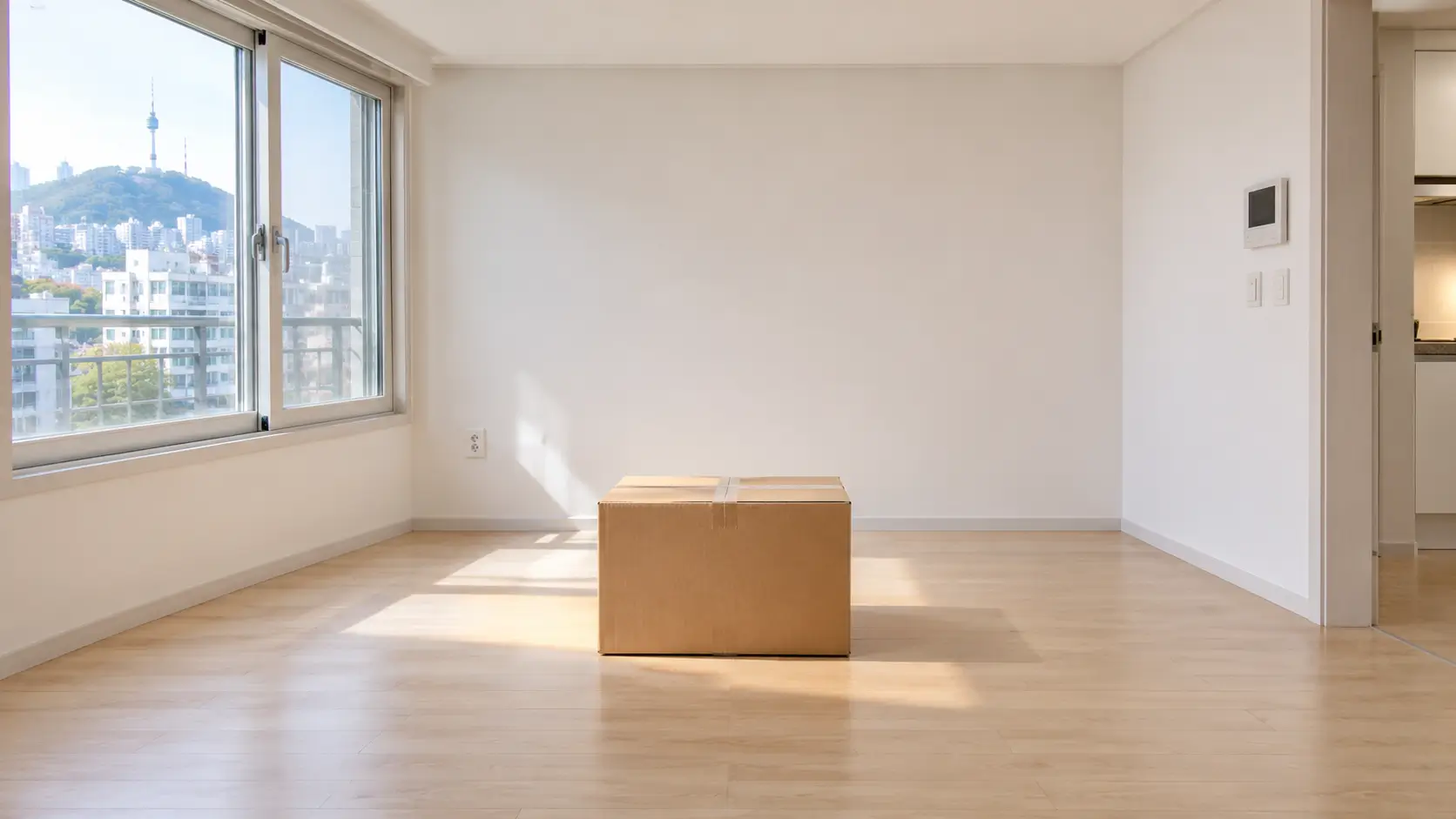
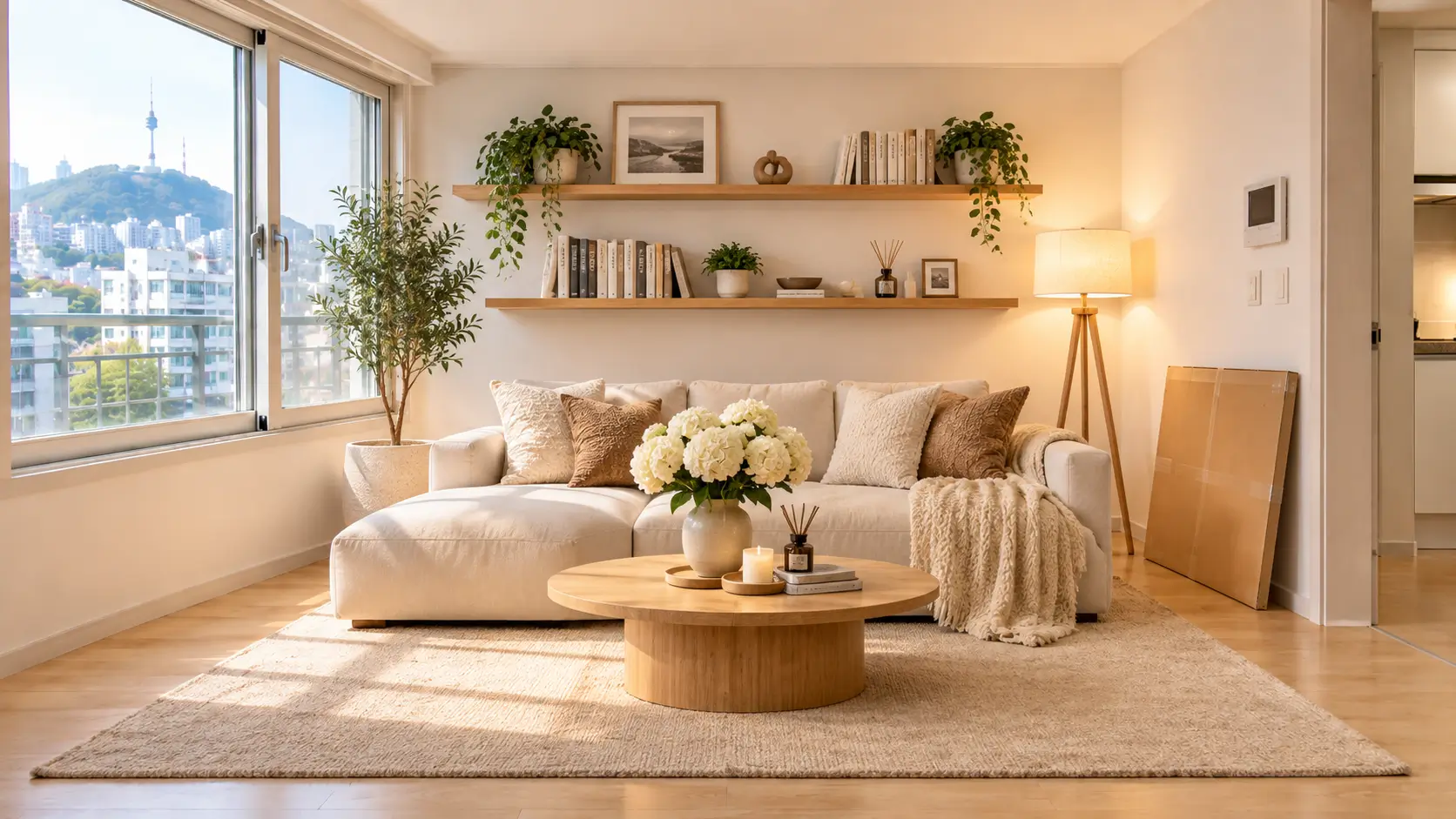
A photo of the empty room was set as the start frame and a photo of the finished room as the end frame. Veo 3.1 filled the 8 seconds in between, box burst and flying furniture included.

Input images

Veo 3.1 start frame: an empty room with a single cardboard box on the floorVeo 3.1 end frame: the same room furnished with a sofa, shelves, plants and a floor lamp

Prompt

Fixed wide shot of the empty room. The cardboard box shakes, then bursts open, and furniture flies out and assembles itself at high speed: a rug unrolls, a low sofa lands, shelves snap onto the wall, and plants, books and a floor lamp pop into place until the room matches the last frame. The lamp clicks on at the end. Fast, satisfying stop-motion energy. Whooshes, thuds and clicks, then a soft chime. No people, no on-screen text.

Veo 3.1 Lite: glass tangerine ASMR

A vertical clip from text alone. The crack of the glass and the tinkle of the shards were written into the prompt. For short experiments like this one, Lite is enough and uses fewer credits.

Prompt

Extreme macro ASMR shot, fixed camera. A chef's knife slowly slices through a tangerine made entirely of translucent orange glass, resting on a dark wooden cutting board. The glass splits with a crisp crack and reveals glossy glass segments inside, while tiny shards scatter across the board. Soft studio lighting, shallow depth of field, sharp reflections. No music, no voice, only the knife, the crack and delicate tinkling glass.

Veo 3.1 Lite: an ad shot from one product photo

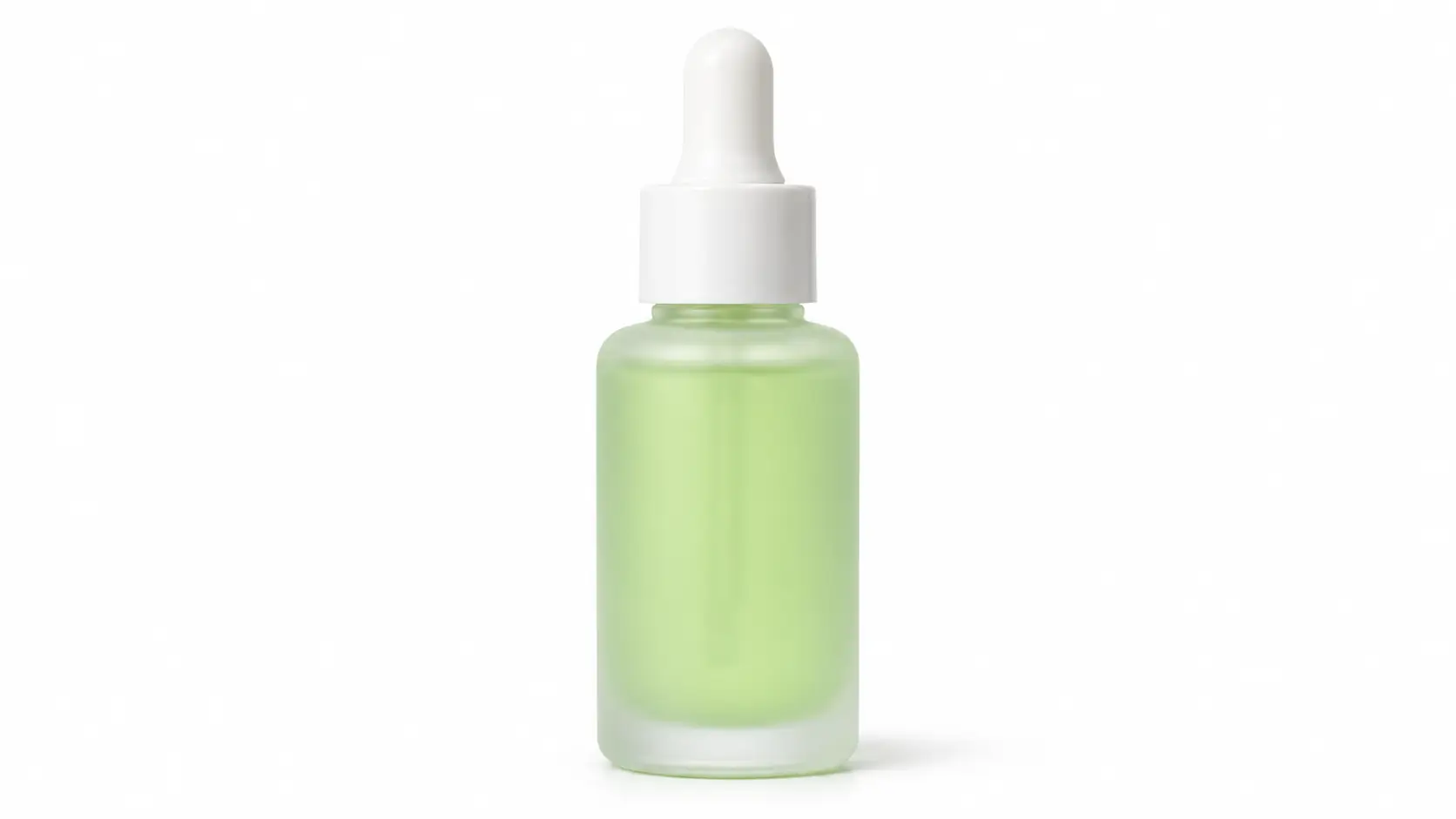
One photo of a serum bottle went in as a reference image. The bottle keeps its shape and color from the photo, while the setting, the splash and the one-line voiceover come from the prompt.

Input images

Veo 3.1 Lite reference image: a frosted glass dropper bottle of pale green serum

Prompt

The serum bottle from the reference image stands on a wet dark stone surrounded by fresh green tea leaves. A slow-motion splash of clear water rises around it as the camera pushes in and tilts up slightly. Morning light through the leaves, droplets on the glass, shallow depth of field. A soft splash, a gentle chime, and a calm female voice says in Korean: "아침을 깨우는 한 방울." No on-screen text.

What is Veo 3.1?

Veo 3.1 is an AI video generation model from Google DeepMind, announced on October 15, 2025. It turns text or images into video and generates the audio in the same pass. Because dialogue, sound effects and ambient sound are made together with the picture, lips and timing line up.

Compared with Veo 3, it follows prompts more closely and produces better-looking video from images. A January 2026 update brought vertical 9:16 to videos made from reference images and added 1080p and 4K output.

Veo 3.1 Lite followed on March 31, 2026. Google describes it as its most cost-effective video model. Both Veo 3.1 and Veo 3.1 Lite are available on Seedance.kr, with the settings shown in the table below.

Veo 3.1 vs Veo 3.1 Lite specifications and credits
Veo 3.1Veo 3.1 Lite
Best forFinal output, ads, client workDrafts, prompt tests, volume
Video length8 seconds8 seconds
Resolution720p, 1080p, 4K720p, 1080p, 4K
Aspect ratios16:9, 9:1616:9, 9:16
SoundDialogue, effects and ambience includedDialogue, effects and ambience included
Reference imagesUp to 3Up to 3
Start and end framesYesYes
One 720p video20 credits10 credits
One 1080p video25 credits15 credits
One 4K video60 credits50 credits

Based on the settings and credit rates currently on Seedance.kr.

Veo 3.1 or Veo 3.1 Lite: which one to pick

Both take the same length, ratios and inputs, so a prompt moves between them unchanged. Block out the scene on Lite, then rerun the take you like on Veo 3.1 and you spend fewer credits getting there.

For the take you keep

Veo 3.1

It is more precise in the places you notice up close: skin texture, lighting, facial expression. Use it for ad shots, client work and anything that ends up on a big screen.

  • 720p, 1080p or 4K
  • 8 seconds, 16:9 or 9:16
  • Dialogue and sound effects included

For drafts and big batches

Veo 3.1 Lite

The lightest model in the Veo 3.1 family. It suits the stage where you rewrite the prompt several times, and jobs with many clips such as Shorts and Reels.

  • Half the credits of Veo 3.1 at 720p
  • Same length and ratios as Veo 3.1
  • Dialogue and sound effects included

Veo 3.1 vs Seedance 2.0: what's different

One Seedance.kr account runs both models, so the quickest comparison is to give them the same prompt and watch the two results.

As a rule of thumb: choose Veo 3.1 for a single 8-second shot in 4K with clearly spoken dialogue. Choose Seedance 2.0 when you want several shots inside 15 seconds, a dance copied from a reference clip, or a scene cut to music you already have.

Veo 3.1 vs Seedance 2.0 comparison
Veo 3.1Seedance 2.0
Made byGoogle DeepMindByteDance
Video length8 seconds4–15 seconds
Max resolution4K1080p
Aspect ratios16:9, 9:1616:9, 9:16, 1:1, 4:3, 3:4, 21:9
Reference imagesUp to 3Up to 9
Reference video and audioNot supportedUp to 3 each
Start and end framesYesYes
SoundGenerated with the videoGenerated with the video, audio references accepted

Based on the settings currently on Seedance.kr.

What you can do with Veo 3.1

All of this applies to Veo 3.1 Lite as well.

People who speak

Put a line in quotes and the character says it, with matching lip movement. Name the speaker and scenes with more than one person stay clear.

Sound effects and ambience

Sound that fits the picture is added even if you never ask for it. If you know what you want to hear, write it down: "a subway train in the distance".

Up to 4K

Pick 720p, 1080p or 4K. 4K earns its credits on a large monitor or TV, and on footage you plan to crop in the edit.

Image to video

Add up to 3 reference photos of a person, product or place and Veo 3.1 keeps their look in the video. One product photo is enough to get an ad shot.

You set the first and last frame

Give it an opening image and a closing image and Veo 3.1 fills the 8 seconds between them. Good for before-and-after, scene transitions and endings that land on a logo.

Vertical for Shorts and Reels

Generate in 9:16 and the clip goes to YouTube Shorts, Instagram Reels or TikTok without cropping. Landscape videos are 16:9.

How to use Veo 3.1

It runs in your browser. There is nothing to install.

1

Pick a model

Choose Veo 3.1 or Veo 3.1 Lite in the model picker. You can switch at any time without retyping anything.

2

Describe the scene and the sound

Say who is there, what they do and where, and put spoken lines in quotes. Add the camera move and the sounds you want to hear.

3

Add images (optional)

Upload up to 3 reference images, or set a start and end frame. Text alone is fine too.

4

Generate and download

Set the aspect ratio and resolution, then generate. Most videos are ready within a few minutes.

Veo 3.1 FAQ

Something we missed? Write to support@seedance.kr.

Veo 3.1 is an AI video generation model that Google DeepMind announced on October 15, 2025. It takes text or images and generates video with dialogue, sound effects and ambient sound in one pass. On Seedance.kr it makes 8-second videos in 16:9 or 9:16 at up to 4K.


Veo 3.1 Lite is a lighter version that Google released on March 31, 2026. On Seedance.kr the two share the same video length (8 seconds), aspect ratios, resolution options and image inputs. They differ in detail and cost: Veo 3.1 renders texture and expression more precisely, and Veo 3.1 Lite uses half the credits of Veo 3.1 at 720p.


Yes. New Seedance.kr accounts get free credits, with no credit card required. To make them last, start with Veo 3.1 Lite at 720p. When they run out you can continue with a credit pack or a subscription.


Open Seedance.kr in a web browser, choose Veo 3.1 in the model picker, type a prompt or upload an image, and press generate. You don't need a separate Google AI subscription and there is no software to install. You can also start from the box at the top of this page.


It depends on the resolution. 720p costs the least and 4K the most, and at any given resolution Veo 3.1 Lite costs less than Veo 3.1. Credits per resolution are in the specifications table on this page, and plan prices are on the pricing page.


Go in this order: subject, action, place, camera movement, lighting, sound. Write dialogue in quotes and say who speaks it, as in: She says: "...". The clip is 8 seconds long, so one or two sentences of speech is about right. Describe what the viewer would actually see, so "slow push-in from a medium shot to a close-up" rather than "a cinematic video".


Yes, in two ways. Add up to 3 reference images and the person or product in them keeps its look in the video. Or set a start frame and an end frame and get an 8-second video that connects the two. Uploaded images are cropped to the aspect ratio you chose, 16:9 or 9:16, before they are used.


One generation is 8 seconds. For something longer, generate several shots and join them in a video editor. Using the last frame of one shot as the start frame of the next keeps them continuous. If you want a longer clip in a single generation, Seedance 2.5 goes up to 30 seconds and is available on the same account.


It depends on the video. Veo 3.1 is the stronger choice for 4K output and for 8-second clips with spoken dialogue. Seedance 2.0 lets you set the length anywhere from 4 to 15 seconds and accepts up to 9 reference images plus reference video and audio, which gives you finer control. On Seedance.kr both run on one account and one credit balance.


Paid plan users can use generated videos for commercial work such as ads, social media and client projects. Videos made on the free plan are for personal use only.


No. Seedance.kr is an independent service and is not affiliated with Google. Your videos are generated by Google's Veo 3.1 and Veo 3.1 Lite models, and other video models such as Seedance and Grok Imagine are available on the same account.


Make your first Veo 3.1 video

Free credits land in your account as soon as you sign up. No card, nothing to install.

Veo 3.1 AI Video Generator, with Veo 3.1 Lite | Seedance.kr